How to map a literature review

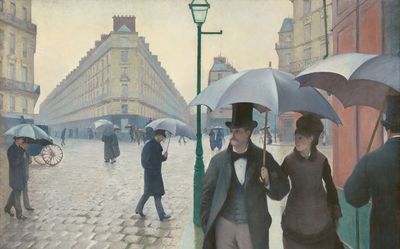
Ok, so let’s say you’ve read through a bunch of sources, annotated relevant passages in Zotero, and come up with some interesting ideas.
You sit down to write. But the draft reads like a tedious list of disconnected ideas. There’s no spark. You know the insights are in there, because you saw them when you covered the material, but they haven’t made it into the final result.
It’s hardly surprising when your supervisor, or even some brutally kind friends and colleagues, tell you that you’re not really synthesizing any of the existing material into something new.
Why do literature reviews turn into author lists?
According to Webster and Watson (2002), a review should be “concept-centric,” and one which is organized by author “fails to synthesize the literature.” When Boote and Beile (2005) studied education dissertations, they found that “Synthesized and gained a new perspective on the literature” averaged 1.42 on a scale of 1 to 3.
Why is it so easy to fall into this trap? Well, if you read through a source, summarize it, and then move on, inevitably the resulting ideas will be grouped by those authors.
There’s a step missing in your process. After you gather your primary sources, and before you start writing, you need to place all the ideas side by side, rearrange them until the themes become apparent, and only then, use this to outline your argument.
What is a literature map?
Perhaps it’s easier to start with what it’s not. It’s not a citation map. Tools like Litmaps and Connected Papers show how papers are related through citations, and that’s useful for finding material, but not necessarily useful for illustrating why that material is related in the first place.
You want to see what these sources say about the question you are asking, where they converge on a topic, or where they depart. And, as you might imagine, there isn’t a magical “right way” to go about it. To some extent, figuring out those relationships is the very process of synthesis. Pat Thomson covers several approaches, and concludes, “I think it’s good to design your own map.”
Worked example: The modern city
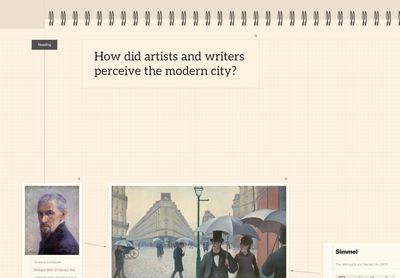
The first thing you should do is put the question at the top of the page. Everything in your argument should relate to this question in some way, so it helps to keep it in mind throughout.
Then it can be useful to lay out your sources, one per card. I tend to add some images at this point to bring things to life, along with any key ideas or quotes. Usually just a few lines will do. You aren’t trying to replicate everything here, just place the sources in context.
- Baudelaire, “The Painter of Modern Life” (1863), the artist Constantin Guys: the flâneur, at home in the crowd, watching it.
- Simmel, “The Metropolis and Mental Life” (1903): the city floods the senses, people protect themselves by not reacting (the blasé attitude).
- Benjamin, The Arcades Project (1927 to 1940, unfinished, published 1982): the Paris arcades, glass-roofed shopping streets made for strolling. Thousands of notes and quotations, sorted into bundles.
- Vertov, Man with a Movie Camera (1929): a day in one city, filmed in four (Moscow, Kyiv, Kharkiv and Odessa), no intertitles.
Identifying Themes
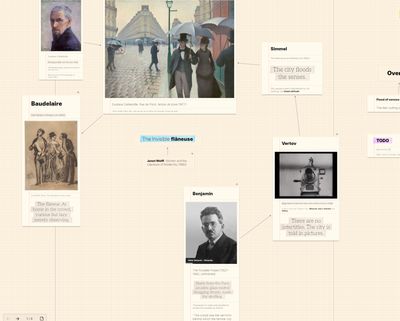
Already a few themes will start to emerge. The flooding of the senses; rapidly changing landscapes; the onset of photography - and then cinema - as the dominant medium of the 20th century. How passive watching and implicit voyeurism are reinforced by this.
Arranging the cards can also help to reveal some interesting insights. In this case, the sources are looping around and revisiting earlier ideas in a meandering and undirected fashion. You can also start to explore the “negative space” and see which ideas are conspicuously absent, such as a woman walking the city - “The Invisible Flâneuse,” Janet Wolff (1985).
Exploring the Question
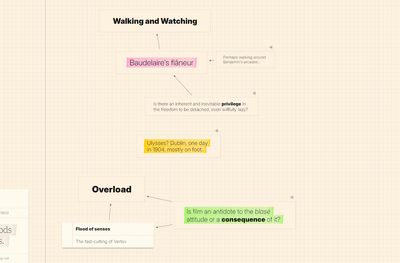
After you have arranged the sources, and formed a rough idea of your argument, you can introduce some mind mapping. Capture ideas which seem interesting to you and then expand them one step at a time. Using size and highlights can help to punch up something important, but the key is to stay nimble and move around the ideas quickly. Afterward, you can reorganize them and gain further insights.
I find it useful to divide the sheet into sections around this point. The first section for primary sources, the second section for the “fantasia,” exploring and reflecting on the ideas, and the third section for the outline which forms the basis of further writing.
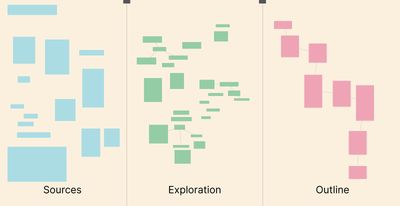
The Outline
This is where you structure your ideas into an argument which answers the question. For each aspect, add a card, with a note for each sequential idea. I also like to connect the cards together, so they visually flow. The cards don’t have to be lined up or squared into a grid, they can weave about somewhat on the page.
Expect things to move around a lot here. Ideas might jump from card to card or entire sections will come and go. At each step, you are measuring the outline against your goal: is it developing my position, is it addressing the question?
When you’re happy, or when you feel a deadline looming, copy the outline as Markdown and use a word processor for final edit and polish.
Limitations
If you have dozens of sources, then it’s better to divide them up into several sheets when working at this level of detail. You can use a high-level sheet to link them together and develop broad themes. Loose Thought makes this easier with #tag searching and linked notes.
It’s also worth remembering that a concept map isn’t a reading tool. You’ll probably still want to use a dedicated tool like Zotero to annotate PDFs and maintain a bibliography.
You may also want to cultivate something like the “Conceptual Synthesis Excel Dump,” as described by Raul Pacheco-Vega. This is a collection of concepts, citations, notes and quotes. All of these feed into the concept mapping phase, where you develop a visual understanding of how these ideas relate to each other.
Try it out
The simplest way to get started is with a big piece of paper and some index cards. That will get you a long way. If you want to include some digital media, or just prefer typing to writing, then you can try Loose Thought free for a week.
Loose Thought is modeled after a physical notebook, and captures the feel of “thinking on paper” along with all the benefits of digital media and cross-device synchronization.